Nail Art Designs & Ideas
Afex DigitalBeauty
0.00.00 Reviews
- Version
- 1.26.0
- Installs
- 100.00K
- Age Rating
- Everyone
Screenshots
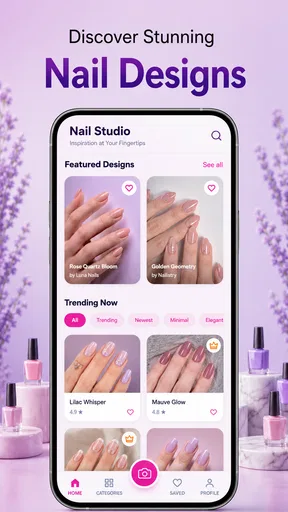
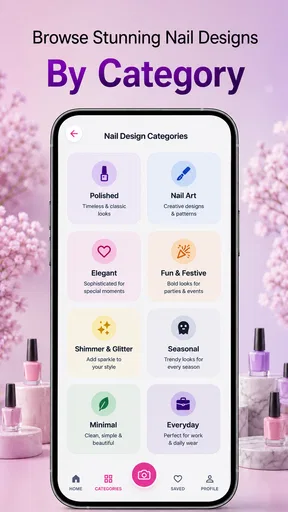
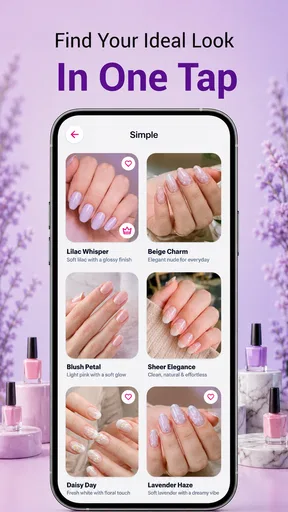
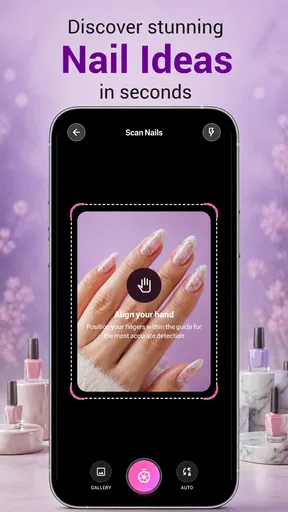
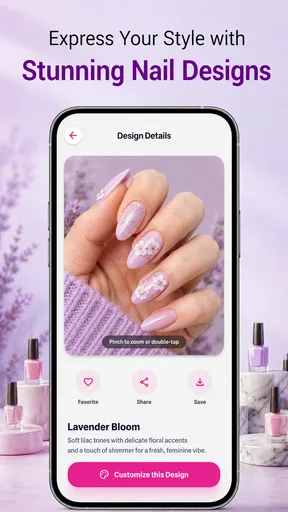
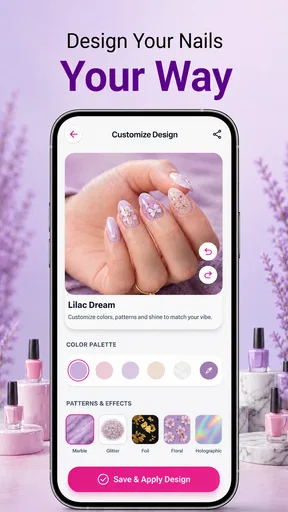
Our Review of Nail Art Designs & Ideas
 Analysis by Appyee
I opened Nail Art Designs & Ideas looking for something more useful than a random stream of pretty manicure pictures. In practice, it works best as a visual planning app: a place to browse nail looks, notice details worth copying, and collect direction before a salon appointment or a weekend manicure at home. It sits in the beauty category, and its focus is narrow enough to be immediately clear. You are not getting a general beauty planner or a nail-care course; you are getting an idea-led tool for choosing a style.
That focus is its biggest strength. When I already know I want something seasonal, delicate, bold, short-nail friendly, or suitable for an event, browsing designs is quicker than searching through broad social platforms. The app is free to install, which makes trying it low-risk. Afex Digital is the developer, and the app is marked suitable for Everyone, so it is approachable for casual browsing as well as for people who take manicure planning seriously.
How the app fits into a real manicure routine
The most practical way to use it is not to scroll endlessly. I get more from it when I begin with a specific decision: color family, nail length, occasion, or the amount of work I am willing to do. That turns the app from a gallery into a small source of design references. I can compare a simple accent nail with a full set, look at how much visual detail I actually want, and settle on a direction before buying polish or showing a reference to a nail technician.
For example, imagine I have an appointment after work and only a few minutes to decide. Instead of describing “something elegant but not boring,” I can browse until I find a design with the right balance of negative space, shimmer, or decoration. I would then save or screenshot the most useful reference if my workflow allows it, and show the image at the appointment. That is a more realistic use than expecting the app to perform the manicure itself.
The store short description is simply “Nail Art Designs,” but the experience is broader in purpose than those words suggest. It is about inspiration and comparison. I found the app most helpful when I treated each image as a starting point rather than an exact promise of what my own nails would look like. Nail shape, length, polish quality, lighting, and the skill of the person applying the design can all change the final result.
Browsing with a decision in mind
A useful trick is to separate inspiration into three questions: do I like the colors, do I like the structure, and could I realistically wear or create it? A design may look attractive because of its color combination while being too detailed for a quick home manicure. Another may have a simple pattern but depend on long nails to look balanced. Using those questions while browsing prevents the common problem of choosing an image that is beautiful but impractical.
I also recommend paying attention to the small elements rather than judging a whole set at once. A thin line, one metallic detail, or a single decorated nail can often be adapted to a simpler manicure. This is one of the app’s less obvious benefits: it can help you extract a manageable idea from a more elaborate reference. You do not need to copy every visible detail to get value from the image.
For salon users, the app can reduce vague communication. A technician can work more effectively from a visual reference than from a string of adjectives, although I would still explain what needs changing. I might ask for the same mood in shorter nails, less glitter, or a softer color. For home users, the same process helps identify whether a design needs tools such as a fine brush, dotting tool, stickers, or patience for repeated layers.
What free access means here
The main financial advantage is straightforward: the app is free to install, so I can explore its nail inspiration without paying an entry fee. That matters for an occasional user who only wants ideas before a single manicure. It also makes sense for someone who is unsure whether a dedicated design app will be useful enough to keep.
There are in-app purchases priced from $1.99 to $15.99 per item. I would treat those as optional paid value rather than part of the basic decision to try the app. The important distinction is that free access lets me assess whether the browsing experience actually improves my planning. If I only need a few references, I would not assume that paying is necessary. If a paid item offers a collection or material I genuinely expect to use repeatedly, the higher end deserves more careful thought.
Because purchases are item-based, I would avoid buying impulsively after a long scroll. First, I would decide how often I expect to use the app, whether the free material already covers my style, and whether the paid content solves a specific problem. A one-off manicure does not automatically justify the most expensive option. On the other hand, someone who regularly designs nails may value a deeper source of references more than a person who changes style only a few times a year.
I appreciate that this pricing structure leaves room for casual use, but it also creates a trade-off: the free experience may be enough for inspiration, while the paid side could be tempting before I know how much practical value it adds. My advice is to use the free portion as a test period in everyday terms. Can I find suitable ideas quickly? Do the references help me make decisions? Am I returning because the app is useful, or merely because scrolling is easy?
Where the app delivers real value
The strongest value is speed. A dedicated nail gallery keeps the search centered on manicure ideas instead of mixing them with unrelated beauty content, advertisements, tutorials, and personal posts. That narrower purpose can save time when I already have a manicure decision to make.
It is also useful for translating a mood into a visual direction. “Clean,” “playful,” “dramatic,” and “soft” are subjective words, but browsing examples helps me see which details create that feeling. I can notice whether the effect comes from contrast, a restrained palette, a glossy finish, repeated geometry, or decoration concentrated on one finger. This makes the app more valuable as a design reference than as a simple collection of finished pictures.
Another strength is idea adaptation. I can take a detailed look and reduce it to two colors, use one pattern instead of five, or move a feature to an accent nail. That approach is especially helpful for beginners who want something more distinctive than plain polish but are not ready for advanced nail art. It also gives experienced users a way to break out of repeating the same familiar designs.
For a nail technician or beauty student, the app can function as a quick visual prompt during client conversations. I would not treat it as a technical manual, but it can help a client react to concrete examples. A customer may not know the name of a style, yet immediately recognize a shape or palette that feels right. That can make consultation more efficient.
The app is less valuable if I expect step-by-step instruction, product recommendations, or a reliable way to reproduce every image. Its value is strongest before the polish is applied: choosing, narrowing, adapting, and communicating. Once I understand that role, the experience feels more coherent.
Trade-offs compared with familiar alternatives
The obvious alternative is a broad visual platform. Those services usually offer a much larger mix of creator content, tutorials, trends, and personal posts. They may be better when I want to follow particular artists, learn a technique, or see a design demonstrated from start to finish. Their weakness is distraction. Finding a usable manicure idea can take longer because the search is surrounded by content that is attractive but not immediately relevant.
A general image search is useful when I want a very specific phrase or need to compare designs from many sources. However, the results can vary in quality and context, and it is easy to lose track of which image is realistic for my nail length or skill level. Nail Art Designs & Ideas feels more focused for browsing, though a broad search may still be better when I need technical instructions or a particular product.
Video platforms have the opposite advantage. They can show application order, brush movement, drying time, and corrections. If my main question is “How do I create this effect?”, a tutorial is probably a better first stop. This app is more suitable for answering “What kind of effect do I want?” I would often use the two approaches together: choose a design here, then find instruction elsewhere if I decide to recreate it.
Printed salon menus and saved screenshots are simpler alternatives, especially for someone who dislikes browsing on a phone. Yet they are less flexible when I want to explore several moods quickly. The app earns its place by making discovery convenient, not by replacing every other nail resource.
One practical limitation is that inspiration images can encourage unrealistic expectations. A reference may depend on professional preparation, carefully shaped nails, specialized tools, or lighting that emphasizes the finish. I would always adapt the design to my actual situation. That is not a flaw unique to this app, but it is an important reason not to confuse a gallery with a guarantee.
Who will get the most from it
I think the app suits three groups particularly well. First are casual users who want fresh ideas before a salon visit and do not want to pay simply to browse. Second are home manicure users who can handle basic polish but need help choosing a pattern or color combination. Third are people who enjoy visual experimentation and want a dedicated place to explore styles without building every search from scratch.
It can also help someone preparing for a wedding, party, holiday, interview, or photo session. The useful workflow is to begin browsing several days before the appointment, narrow the options to a few realistic references, and then consider clothing, jewelry, nail length, and maintenance. A dramatic look may be perfect for one evening but inconvenient if I need it to remain subtle at work. The app helps with the first part of that decision, while I still need to apply personal judgment.
Beginners should use it as a source of manageable variations. Instead of attempting the most complex set immediately, I would choose one feature to practice: dots, a simple gradient, a contrasting tip, or a single accent nail. This turns browsing into a learning plan. It is a more sensible use of the app than collecting elaborate images that I have no intention of attempting.
Professionals may find it useful during inspiration conversations, but they should not expect it to replace their own portfolio, technical knowledge, or client records. A technician needs to judge feasibility, materials, time, and nail condition. The app can support that discussion, not make those professional decisions.
Who should skip it
I would skip it if my priority is detailed education. Someone learning nail preparation, gel application, extensions, removal, or troubleshooting will need a tutorial-focused resource. A gallery can show the destination, but it does not necessarily teach the route.
I would also skip it if I already have a trusted collection of saved designs and rarely look for new ideas. In that case, another inspiration app may add more scrolling than value. The free installation makes testing easy, but free does not mean every user will benefit from adding another visual feed to a phone.
Users who want exact product matching should look elsewhere or confirm details independently. A design reference does not automatically tell me which polish shade, finish, tool, or technique produced the result. Likewise, anyone who expects an automatic virtual try-on experience should not choose this app for that reason. Its useful role is browsing and planning, not replacing a physical test.
Device details and day-to-day practicality
The current version is 1.15.0, and the app supports Android 7.0 and later. That relatively broad compatibility makes it accessible on older Android devices, although the actual comfort of browsing will still depend on screen size, storage, and general phone performance. Nail designs rely heavily on visual detail, so a larger, sharper display will naturally make comparison easier than a small or aging screen.
With more than ten thousand installs, it is an established enough niche app to attract a real audience, while still feeling specialized rather than like a huge mainstream platform. I would not use the install count as proof that every design will suit me. The better test is whether its selection matches my taste and whether I can move from browsing to a clear manicure decision without unnecessary friction.
The Everyone content rating also makes it comfortable to consider for general household use. A parent, teenager, beginner, or salon customer can browse ideas without the app being positioned as adult-only content. That does not remove the need for sensible nail-care choices, but it does make the app easy to recommend as a harmless creative reference.
My buy-or-skip verdict
I would recommend trying Nail Art Designs & Ideas if I wanted a focused, free starting point for choosing a manicure style. Its best contribution is not technical instruction; it is helping me turn a vague preference into a concrete reference. I can browse with a purpose, adapt an elaborate image to my own skill level, and arrive at a salon or home workstation with a clearer plan.
I would keep my expectations measured around the in-app purchases. The free installation is enough to justify testing the experience, while paid items from $1.99 to $15.99 should be judged by repeated usefulness rather than impulse. I would pay only when a specific item offers material I expect to revisit, not simply because a design looks attractive in the moment.
My final decision is a qualified buy for inspiration and a skip for education or exact recreation. If you want a practical visual companion before your next manicure, this app is easy to try and has a clear purpose. If you need tutorials, product guidance, or professional-level technical detail, a different tool will serve you better. The right way to use it is as a design filter: browse less, compare carefully, and leave with one realistic idea you can actually wear.
Privacy and Permissions
See what permissions an app requests and how it handles your data.
- Photos/Media/Files
- read the contents of your USB storage, modify or delete the contents of your USB storage
- Storage
- read the contents of your USB storage, modify or delete the contents of your USB storage
- Camera
- take pictures and videos
- Microphone
- record audio
- Other
- view network connections, full network access, prevent device from sleeping, Google Play license check, read Google service configuration
Verdict
Strengths of Nail Art Designs & Ideas
- Large collection of nail art ideas for different styles and occasions.
- Helpful visual references make it easier to recreate designs at home.
- Includes simple designs suitable for beginners.
- Useful for discovering seasonal colors, patterns, and manicure trends.
- Ideas can inspire personalized combinations of colors and decorations.
Limitations of Nail Art Designs & Ideas
- Some designs may require tools or skills that beginners do not have.
- Image quality and design details may vary between entries.
- The app may include repeated or very similar nail art ideas.
- Ads can interrupt browsing and make navigation less convenient.
- Not every design includes detailed, step-by-step application instructions.
Similar Picks in This Category
View All
Beauty Makeup Editor & Camera
Photo & Video Editors - Instant Solution4.7

Perfect365: Face Makeup Editor
Perfect365, Inc.3.5

Mirror Plus - HD Mirror app
Digitalchemy, LLC4.8

Cute Lock Screen & Wallpapers
Prometheus Interactive LLC4.6

HD Camera for Android
One Music Player4.5

Phone Mirror app - True Mirror
Cards4.6
Frequently Asked Questions
What is Nail Art Designs & Ideas, and what can I find in the app?
Nail Art Designs & Ideas is an inspiration app for anyone interested in manicure styles, nail decoration, and creative beauty looks. After exploring it, users can browse collections of design ideas, including simple everyday nails, seasonal themes, elegant patterns, colorful styles, and more detailed artistic concepts. It is mainly intended to help you discover ideas and plan your next manicure rather than replace professional nail-care advice.
Is Nail Art Designs & Ideas suitable for beginners?
Yes, the app can be useful for beginners because it presents a wide range of nail designs, from relatively simple patterns to more elaborate looks. New users can start by saving easy ideas and gradually try more advanced techniques as their confidence improves. However, the images may not always include complete step-by-step instructions, so beginners may need additional tutorials or practice to recreate complicated designs accurately.
Does the app provide tutorials or only nail design inspiration?
The main purpose of Nail Art Designs & Ideas is to provide visual inspiration and help users discover different manicure concepts. Depending on the specific design, some entries may offer useful details or recognizable technique ideas, but the app should not be treated as a complete professional nail-art course. If you need exact product recommendations, detailed instructions, or guidance for difficult techniques, you may need to consult external tutorials.
Can I save or share my favorite nail designs?
The app is designed to make browsing and collecting nail-art inspiration convenient. Depending on the version and device, users may be able to bookmark, save, or share designs they like through their phone’s available options. These features are especially helpful when preparing for a salon appointment or creating a personal reference collection. Availability can vary, so it is worth checking the current app permissions and feature list before downloading.
Is Nail Art Designs & Ideas free to download and use?
Nail Art Designs & Ideas may be available as a free download, but the exact experience can depend on the Android or iOS version, advertising, and any optional in-app features. Before installing, review the store listing for current information about purchases, subscriptions, advertisements, and privacy permissions. The app is generally most valuable for inspiration, so users should confirm that its available content and offline or online requirements match their expectations.
